Faqs
The answer to your questions
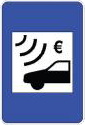
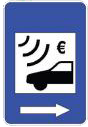
Stretches of motorway where only electronic toll collection is available are identified by the following traffic signs:
|
|
|
Still not sure?– Talk to us
According to Law No. 6/2026, in force since 25 February 2026, heavy vehicles are exempt from toll payments if they cumulatively meet the following criteria:
-
They are Class 3 or Class 4 vehicles, according to the toll classification system;
-
In the case of roads operated by Ascendi, they travel on the A41 motorway, including both electronic toll sections and traditional toll plazas.
To consult the full list of motorways covered, please refer to Law No. 6/2026.
From 25 February 2026 onwards, if your vehicle meets these criteria:
-
You will not be charged for using these roads;
-
Trips made on the A41 between 1 January 2026 and 25 February 2026 do not need to be paid if payment has not yet been made.
Have you already paid for trips covered by this exemption?
If you have paid for trips made between 1 January 2026 and 25 February 2026, you may request a refund of the amounts paid.
To request a refund — Talk to us
Within Ascendi’s tolled network, toll collection has been abolished on the following motorways/concessions:
- A4: Túnel do Marão.
- A13 e A13-1: Pinhal Interior.
- A23: Beira Interior (Torres Novas A1 / Abrantes ).
- A24: Interior Norte.
- A25: Beiras Litoral e Alta.
- A25: Costa da Prata.
Still not sure? – Talk to us
The notification concerns a trip made before the toll collection ceased. We recommend verifying the date and route mentioned in the notification to clarify the situation.
Still not sure? – Talk to us
First, you need to find out from the car hire company if the vehicle had an active Via Verde tag.
If it had an active Via Verde tag:
When you travel through the motorway, the vehicle is automatically identified and the payment is made through your bank account (Via Verde automatic payment) or deducted from the credit on your pre-paid electronic tag (Via Verde pre-payment).
If it did not have an electronic Via Verde tag:
If you did not let the deadline for paying tolls at a CTT post office or a Payshop pass (click here to see when you have to pay), you can pay the tolls at those premises. To do so, you will need to provide the registration number of the vehicle and the date of your journey. If your journey was more than seven business days ago, you will need to wait for the notification, which will be sent to the address you gave the car hire company.
Still not sure? – Talk to us
Click here to find out what payment methods you can use.
Still not sure? – Talk to us
You need to update the vehicle's registration details. The Documento Único Automóvel ("Vehicle Registration and Ownership Title " – DUA) combines the information contained in the vehicle's registration record and the ownership record in one single document, called the Certificado de Matrícula, or registration certificate.
If you want to change the details relating to the ownership or characteristics of the vehicle, for example, change the address or the owner's name, you can do so at the following places:
- Customer service desks at the Instituto dos Registos e do Notariado (Register Offices);
- Customer service desks at the Lojas do Cidadão (“Citizens' Shops”) that offer this service.
Click here to learn more.
Still not sure? – Talk to us
Register or log in in Ascendi Portal to check if tolls to pay associated to you (to your Taxpayer number or Driving License). The notification that you couldn’t collect from the post office will be included in this information.
You can also search for your tolls due in Ascendi Portal without logging in, entering a license plate and date range.
Still not sure? – Talk to us
Payment can be made using the Multibanco details provided in the notification.
Alternatively, you can pay directly on the Ascendi Portal or App, quickly and securely, using a bank card, MB WAY or Multibanco reference, by searching with the billing document number.
Another option is to send a cheque or a Postal Money Order to our address.
Call us on 00351 229 980 200. If the case hasn't yet been sent to the Customs and Tax Authority (Autoridade Tributária e Aduaneira – AT), we can help you.
Still not sure? – Talk to us
If you travel on an electronic toll collection motorway without a tag, you must pay afterwards at a CTT post office or at a PayShop agent. The journey will be available for payment 48 hours after taking place, for a period of 15 working days.
Click here to find out about other payment methods you can use .
Still not sure? – Talk to us
You can ask the post office clerk for a statement confirming your presence there. Send us the statement through our website site, explaining the situation.
Still not sure? – Talk to us
By law, we must charge you double the cost of the longest journey you could have done before leaving the motorway at that exit. It is the ticket that you collect when you join the motorway that lets us know where you joined and how much we should charge you. Without the ticket, we have no way of knowing what route you took.
If you find the ticket later, contact us through our website , attaching the original ticket and explaining the situation.
Yes. In addition to the toll, you pay an extra €0.32 per journey (up to a maximum of €2,56 per payment). These additional charges are applied according to the Portuguese Law (Portaria no. 314-B/2010).
Still not sure? – Talk to us
We will send you a payment notification which includes an additional charge of €2.21 per journey. We send the notification to the name and address shown on the vehicle's registration record, i.e. those held on file at the Motor Vehicle Registry Office. If you still do not pay after receiving the payment notification, the process will be submitted to the Customs and Tax Authority (Autoridade Tributária e Aduaneira – AT) and you will be fined.
Register or log in in Ascendi Portal to check if tolls to pay associated to you (to your Taxpayer number or Driving License). You can also search for your tolls due in Ascendi Portal without logging in, entering a license plate and date range.
Still not sure?– Talk to us
When you pay your tolls at the post office or at a PayShop agent, you pay an extra €0.32 for each journey (up to a maximum of €2,56 per payment).
The best way to pay is with an electronic tag. With an electronic tag, you pay only the tolls; you avoid all additional charges as well as the inconvenience of having to go to a CTT post office or PayShop to pay.
The journey will be available for payment at a CTT post office or at a PayShop agent 48 hours after taking place, for a period of 15 working days.
Still not sure? – Talk to us
If, on the date of the journeys, you were no longer the owner of the vehicle, you have 30 business days to make your case to us. You can contact us 24 hours a day via our website. You should send us the deed of sale so that we can identify the current owner.
If you are registered on the Ascendi Portal or App, you can do this more quickly and directly by accessing the toll debt section and selecting the relevant notification. Register here.
If you do not pay after receiving the notification we sent you, the process will be submitted to the Customs and Tax Authority (Autoridade Tributária e Aduaneira – AT). For every unpaid notification, the Tax Office where you are domiciled for tax purposes divides the process into two:
(a) Tax enforcement proceedings: for the payment of the tolls and additional charges mentioned in the notification (€2.21 for each journey). Administration costs and interest on arrears will also be added to this amount. The tax enforcement proceedings includes the debts related with the infractions occurred each month by the same person/vehicle/(sub)concession.
(b) Offence proceedings: for the payment of the fines applicable to this part of the payment process and respective costs. A case will be opened per day/person/vehicle/(sub)concession of the unpaid notification.
At this stage, the minimum fine is 5 times the sum of the journeys made by one person, in the same vehicle, on a (sub)concession throughout one day (a minimum value of €25 applies), but it may go up to a maximum corresponding to twice the minimum fine amount. For example, if the sum of the journeys done is €10, then the minimum fine would be €50 (€10 x 5) and the maximum would be €100 (€50 x 2). In the case of corporations, the minimum fine is 20 times the value per journey.
The procedural costs are calculated on the basis of the Regulamento de Custas Processuais regulations governing procedural costs and they apply both to the enforcement procedure (a) and to the offence procedure (b), but if you pay voluntarily within 30 business days, you will get a discount of 50% on the procedural costs of the offence procedure (b).
If you still don't pay the amount the Tax Office says you have to pay, they will start the enforcement procedure to force you to pay by seizing your assets. If this happens, the amount owed will continue to rise as interest and procedural costs are added to it.
For trips longer than 17 working days, you will have to wait for a notification to the address you provided at the car rental, or you can check and pay on the Ascendi Portal the amounts you owe – trips made more than 25 days ago (Portuguese license plates) or 3 working days (foreign license plates).
If you do not subscribe to one of the products available for vehicles with a foreign license plate, Ascendi will transfer unpaid toll fees to Collection Entities Abroad (ECE)). Ascendi operates with the following Overseas Collection Entities: EPC; ParkTrade; ETIKA; NIVI.
These Entities charge the vehicle´s owner with a foreign registration number that circulated on the Ascendi network without paying tolls.
Collection is made through a notification sent by letter to the owner, based on information obtained from the car registration institution in the country of registration. In these communications, data are provided for the payment of outstanding travel amounts.
Any clarifications related to collection procedures must be sent directly to the respective entity, through the following websites:
- EPC - www.epcplc.com
- ParkTrade - https://www.epass24.com/
- ETIKA - www.etika-consulting.com
- NIVI - https://easy.nivisecure.com/
By accessing Contact History, you can view the history of messages that have been sent after the account registration date and through Customer Support.